Storage & email
Storage is total capacity, not an allowance that renews each year. One email to one recipient counts as one send. Storage and email add-on checkout is not yet available; contact us about additional capacity.

ClubNest Model Aviation
A simpler home for your model aviation club. Bring memberships, dues, signed forms, flying days and conversations together—so volunteers spend less time on admin and members know exactly where to go.
Setting up your club? Create a Model Aviation workspace
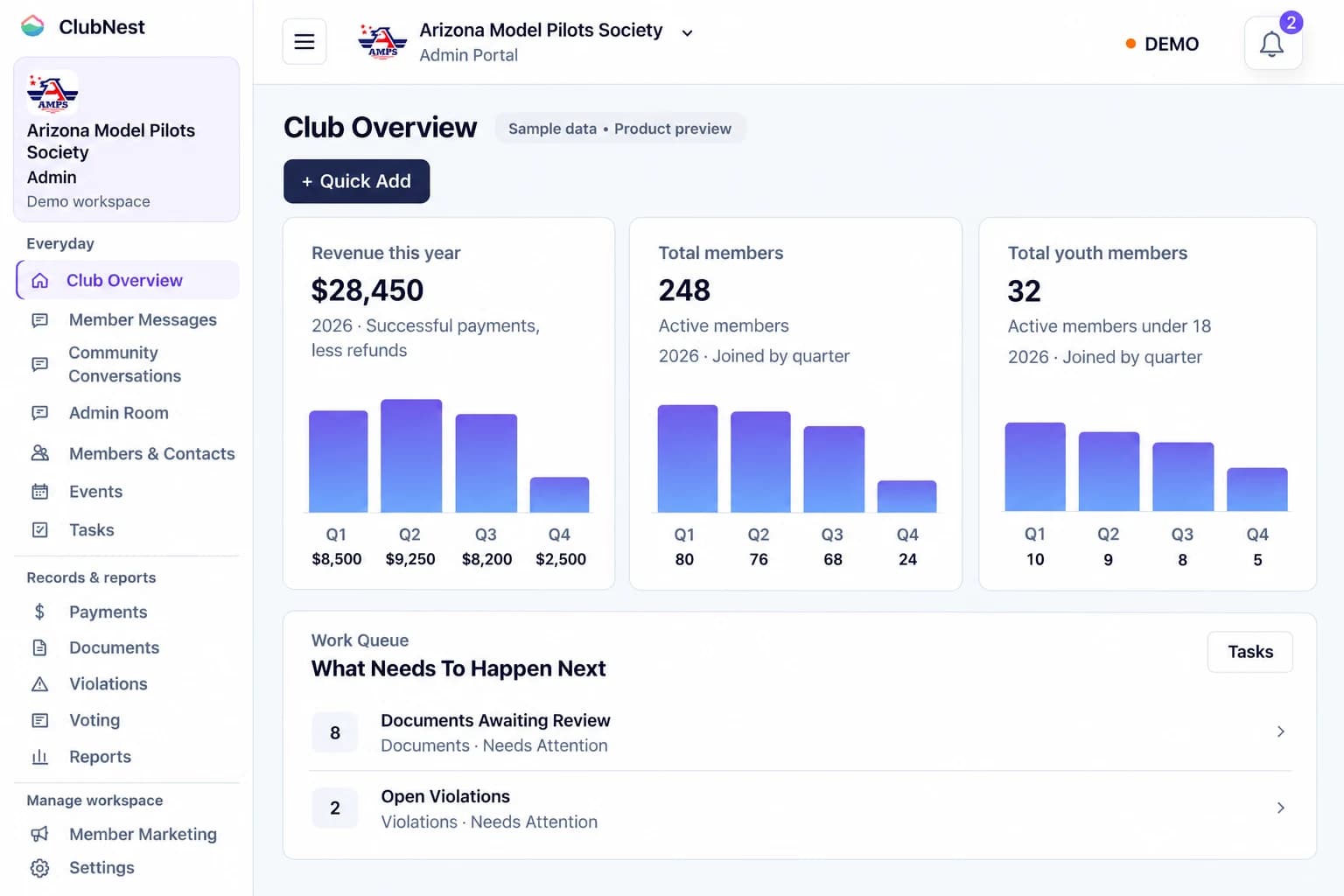
Your club, your members, and all the tools to bring them together.
Administrator accounts and your member portal included.
Card required. Billing starts after your trial; cancel in organization Billing before it ends to avoid a charge. Prices in USD. No ClubNest fee on member dues; provider fees apply.
Storage is total capacity, not an allowance that renews each year. One email to one recipient counts as one send. Storage and email add-on checkout is not yet available; contact us about additional capacity.
Direct support through your admin portal and self-service CSV importing are included. Data cleanup, custom migration and training are quoted separately. Contact us for more than 2,500 members.
Your current plan and allowances stay in place unless the workspace owner explicitly chooses a plan change.
For club administrators
One connected workspace for the everyday work of your club. Eight practical tools keep your records, people and next steps together, from a new member’s first invitation to your next flying day.
Keep your committee’s tasks, private conversations and files together. Give each administrator their own account and a shared view of club activity.
Set your club’s membership options, track renewals and let members print a branded card straight from their portal.
Keep contact details and membership records alongside recorded AMA and FAA TRUST numbers, with permitted profile updates in the member portal.
Plan flying days, invite members and guests, and share registration links and QR passes. Collect optional fees through connected providers.
Share club rules, request forms and collect signatures online. Set due dates and see which documents still need attention.
Give club discussions and private messages a familiar home. Keep members connected between flying days, with an optional adult member directory. When enabled by the club, members choose which permitted name, phone and email fields to share or hide their listing.
Invite new members into a guided start: profile details, required signing documents and dues, connected to the membership your club selects.
See invoices, balances and payment history together. Collect dues and donations through connected providers, with cash and check recording when enabled.
Features depend on your club’s settings and your account permissions. Online payments require a connected Square or PayPal account. AMA and FAA TRUST details are recorded, not automatically verified.
All organization admins share titled group conversations with permanent, named and timestamped messages. Unread-first compact lists open one focused reading page with Back and Next unread controls. A top New Conversation button opens a pop-out composer, with private Documents and Archived conversations links together. Keep attachments and private files in the admin library, with organization document retention applied. Members cannot access this area. Administrator navigation keeps member messages and contacts prominent, with unread counts beside each relevant navigation item. Records and reports remain visible in a consistent navigation list that grows with the page without a separate scroll area. Model Aviation Overview shows quarterly collected revenue and member-joining charts alongside current active member and under-18 totals in one row, followed by the Work Queue. Messages uses a top Compose button and a pop-out composer for individual and group portal delivery, with compact searchable conversations and expandable delivery history. Read one conversation at a time with Back and Next unread controls; direct-message read positions are remembered in the current browser. Community conversations use the same compact list and New Conversation pop-out, with unread activity and replies retained. Aviation Overview shows revenue, active members and renewals needing follow-up before the work queue. Other organization types retain their existing dashboards. Searchable Settings lists open existing forms on demand. Supporting profile details are available on demand.
Create up to 10 named pricing tiers with individual prices and notes, linked to each member’s dues and renewal date. Members can print matching front and back cards with your organization branding and the ClubNest.tech footer. Administrators choose membership type, number, status, expiration and optional contact details in Settings. Model Aviation clubs can also choose recorded AMA and FAA TRUST details; credentials are not automatically verified and these are not AMA-issued cards or proof of insurance.
Keep contact details and notes alongside recorded AMA and FAA TRUST numbers. Members use a compact navigation list grouped into Connect, Manage and Records, from Overview and club conversations to events, elections, payments, documents and personal settings. Their printable membership card is in Membership, with its back available on demand. Their profile uses expandable sections for details, credentials, interests, email choices and completed documents, with organization connections followed by security and account deletion at the bottom. One login can connect to organizations of any vertical without a fixed organization count limit. Members can update visible numbers when the club enables profile editing. Members can leave the organization from Your Portals or their profile, keeping their login and other connections. Historical records and existing obligations remain; owners must transfer ownership first.
Publish gatherings with unlimited registration, calendar links and optional member notices. Include sanction and director details, and configure registration requirements for members and guests. Provide branded QR passes for live registration and payment checks. Enable a public link for guest registration and set an event fee through a connected Square or PayPal account; payment must be confirmed before a paid registration is complete.
The Document Hub separates Library, Requests, Review and History, with collections for club files, operations, membership and safety. Completed PDFs retain the signer, UTC completion time, authenticated account, consent, document fingerprint and form revision; signing-time email, browser and hosting-proxy IP evidence are included when recorded. Historical completions are not backfilled. Use Document Setup to upload, place fields and choose delivery to one member, selected members, all active members or new members only. Reference files need no signature and can be available to all active and joining members. Request private copies for one member, selected members or every active member, including unlinked contacts. Include mandatory forms or reference files for future members when they join or receive an invitation. When required documents are selected for new-member onboarding, ordinary Add Person invitations and joining flows keep membership pending until the member confirms their account email, accepts the joining terms, completes required documents and any membership dues are confirmed paid. Enabled online agreements need the member’s submitted completion or an explicit administrator waiver; reference-only files do not delay activation. Existing memberships keep their current status. Administrators define custom questions and place text, date, checkbox, initials and signature fields on each agreement. Members complete enabled forms in Documents and retain a locked, stamped PDF in their profile after submission; administrators open that completed copy from the member contact. Stamps identify the signer, completion time and record reference beneath each completed field row. Members can also upload with one file control when uploads are enabled; Model Aviation members use + Add file in Documents. Waived requirements show that no completion is needed. Track Sent, Reviewed and Finalized; choose individual reminder stages and due dates. Optional overdue document or dues rules make members inactive; an administrator must reactivate them after outstanding requirements are resolved.
Search conversations by sender or message and filter unread activity. Named replies, date groups and new-message markers distinguish your messages and the conversation starter; open threads refresh automatically while visible. Notifications identify their ClubNest source. Open ballots appear together, with completed elections under Results, showing winners or tied results when voting closes. Connect private conversations, a shared board calendar, board tasks, documents and configured family access, with organization moderation and youth controls still applied.
Quick Add is enabled by default and can be turned off. Select the default membership once. Uploaded club files with saved required signatures are included automatically, with no separate waiver selection. If no signatures are required, members skip the signing step. Invite a new member with their name, email and phone. Their portal guides them through required profile details, club documents and payment. Initial activation follows completion and confirmed payment, with required approvals and youth safeguards still applied.
Keep invoices, outstanding balances and payment history connected to each member. Collect online payments through your club’s connected Square or PayPal account, and record received cash or check payments when enabled. Cash history identifies the receiving administrator and timestamp. Members can add, view masked details and remove cards stored by their club’s connected Square account, after the administrator grants customer permissions. Saving a card does not start automatic charges; PayPal payment methods remain managed in PayPal checkout. Model Aviation members choose a donation amount and pay through a connected Square or PayPal account; only confirmed donations appear in club Payments and the master admin’s club donation records. Sandbox workspaces cannot charge providers.
Your club’s everyday essentials, connected in one workspace.
Manage member profiles, up to 10 pricing tiers, dues and renewals. Model Aviation members see both sides of their club card on Home, with membership status reflecting current club records, expiration and overdue membership dues. They can also print it.
Organize flying days with unlimited registration, optional public guest signups and branded QR passes for check-in.
Let members complete and sign configured club documents in their portal. Track requirements, due dates and welcome emails.
Keep members connected through private messages and club discussions, with an optional adult member directory. When enabled by the club, members choose which permitted name, phone and email fields to share or hide their listing.
Payments require a connected Square or PayPal account; welcome emails require enabled club email delivery. AMA and FAA TRUST details are recorded, not automatically verified. The member directory is off by default. Features, parent access and youth communication depend on club settings and account permissions. Members aged 14–17 provide an unverified parent or guardian contact by default; owners can change that requirement. Contact collection does not grant parent access or establish consent.
Your member portal
Members have one place to pay dues, print their card, sign forms and stay in the know. Your committee manages the same connected records through its own admin portal.
Membership card on Home
See both sides of your membership card on Home, with current membership status, overdue membership dues and expiration reflected from club records; check your renewal date and dues balance, and use the flat member navigation. Print your branded club card with the details your club selects, including optional recorded AMA and FAA TRUST numbers.
Documents & agreements
Complete your club’s custom questions and signature fields, then keep a stamped PDF in your profile. Find required forms and track their status. Use the + Add file control when your club allows uploads.
Upcoming events & club life
Find upcoming flying days, meetings and gatherings. Review event details, add dates to your calendar and manage your registrations from your portal.
Your member community
Join club conversations, follow unread replies and connect with fellow members. Use private messages to keep in touch with your club’s administrators.
Features depend on your organization’s settings and your account permissions.
Create your member account, then connect using your club’s invitation or access code.
From your portal to the flight line
Show members what they can bring with them: a printable club membership card and a registration pass that helps your event team review the right details on arrival.
Your club membership card
ClubNest generates a branded membership card from your club’s records. Members can open it in their portal and print a copy, with the membership details their club chooses to include.
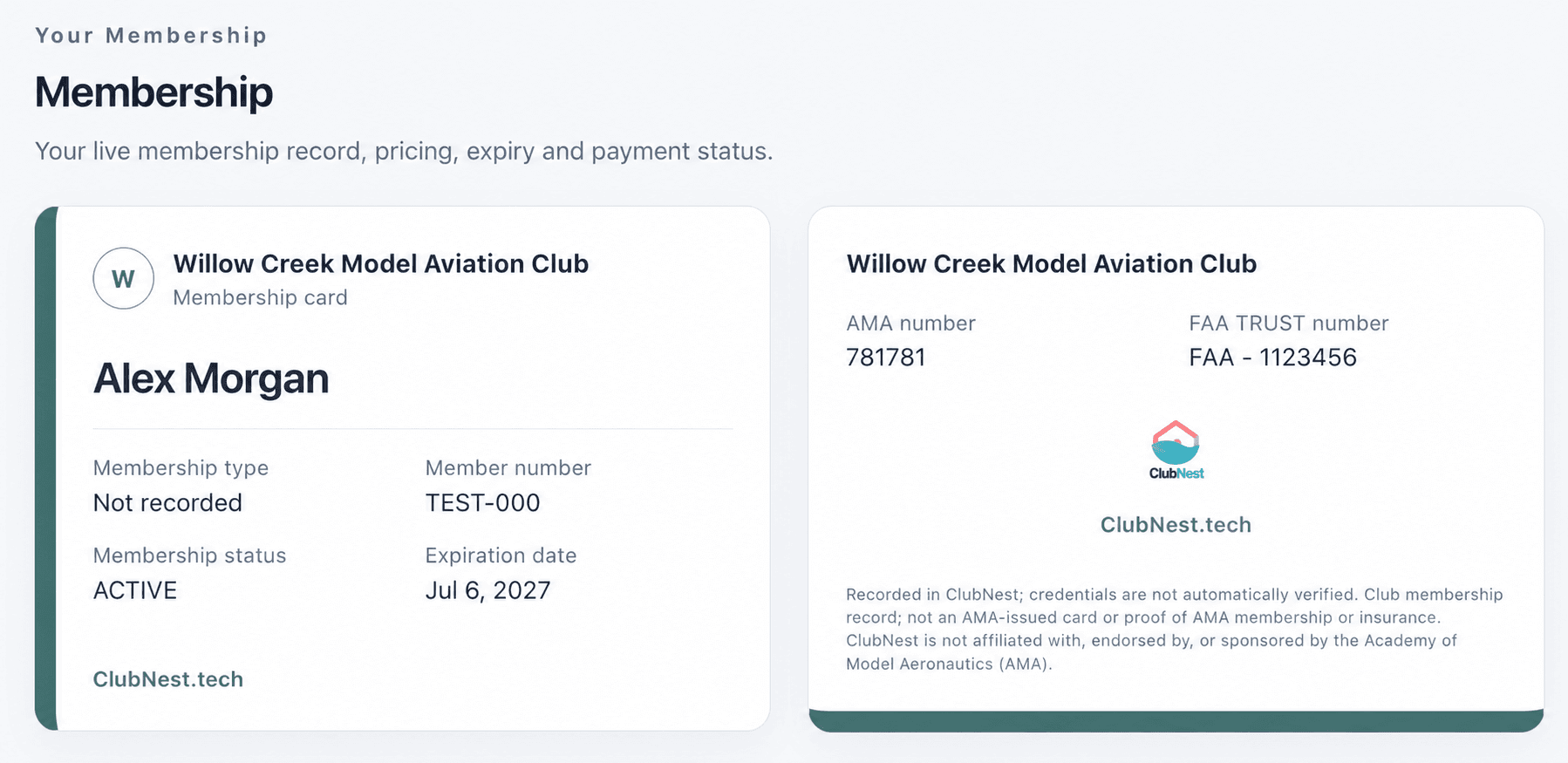
Sample club membership card · fictional member details shown for illustration.
This is your club’s membership card, not an AMA-issued card or proof of AMA membership or insurance. AMA and FAA TRUST numbers are recorded as entered; ClubNest does not automatically verify them. ClubNest is independent of the Academy of Model Aeronautics (AMA).
Pre-registration & event arrival
Prepare for a fly-in before the first aircraft arrives. Collect the details your event needs, share a QR registration pass, and give your event team a current view of registration and payment.
Add dates, event details, an optional AMA sanction number and contest director contact information. Choose whether AMA and FAA TRUST numbers, phone and camping answers are optional or required. Add up to two custom questions, such as aircraft type or flight class.
Members register through their portal. When public registration is enabled, guests can use the event’s shared link. They complete the selected fields and questions. For paid events, fees use your club’s connected Square or PayPal account.
Registrants can bring their pass on a phone or as a printed copy. It shows the event, participant, registration status, payment status and recorded credential numbers. Free admission and confirmed payment are shown separately.
An authorized administrator signs in, or the contest director verifies the email saved on the event for event-only access. Club email delivery must be enabled for director verification. Scanning opens the current registration and payment check, including recorded AMA/TRUST details and custom answers.
The event team reviews credential details under the event’s requirements and resolves outstanding registration or payment issues. Paid admission is ready only after payment is confirmed; free events require no payment. Administrators can record attendance in Events when attendance tracking is enabled.
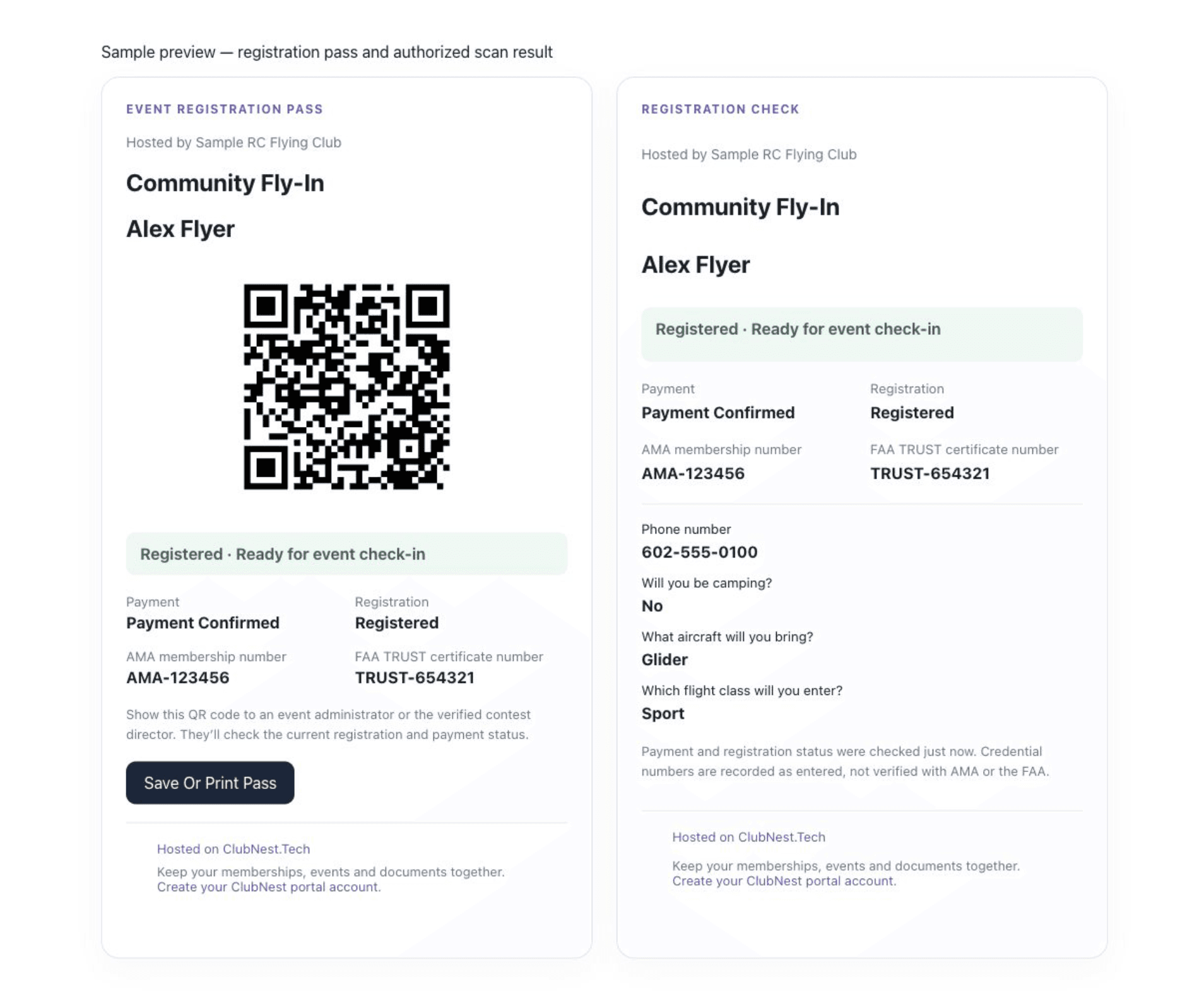
Illustrative registration pass and authorized scan result · Alex Flyer is a sample participant; the QR is a demonstration.
The QR check displays the current record rather than relying on a saved screenshot. A pass with an outstanding fee is not proof of payment or ready admission.
Scanning reviews the registration; it does not automatically verify AMA membership, FAA TRUST credentials or insurance, and it does not automatically mark attendance. Contest director access is limited to the event registration check. Your club remains responsible for its event requirements and admission decisions.
Support your club’s growth
Resources from the Academy of Model Aeronautics (AMA). Explore these independent resources for welcoming new flyers and involving existing members. ClubNest is not affiliated with, endorsed by, or sponsored by the Academy of Model Aeronautics (AMA). Links are provided for convenience; AMA manages its own programs, requirements and enrollment.
Discovery
Use the AMA Club Toolkit for outreach and club promotion ideas. Give interested flyers a clear next step: an invitation to your club’s portal, with membership information and upcoming activities together.
Explore the AMA Club ToolkitFirst flights
Explore the AMA Introductory Pilot Program for supervised beginner flying. Use ClubNest to share your club’s event details, organize registrations and keep required club documents ready to complete.
Explore the AMA Introductory Pilot ProgramYouth & families
Find AMA ideas for youth involvement and community outreach. Organize your own club activities in ClubNest, with event information, required documents and permitted access for linked parents.
Read AMA’s youth and club growth guidanceMember connection
Explore AMA’s Membership 360 approach to growth and retention. Keep your own club involved between flying days with upcoming events, community conversations and a member portal that is useful throughout the year.
Explore AMA’s Membership 360For club administrators
Import supported member and prospective-member contact fields from a reviewed CSV, including AMA and FAA TRUST details. Review memberships, renewals and documents, then invite the appropriate accounts. Review and map contact CSV columns and match membership names to existing plans before importing, or explicitly choose no plan. Historical joining dates are retained on new contacts without enabling later date edits. Pending maps to Applicant, Suspended to Inactive and Expired to Lapsed; original CSV values remain in administrator import history, including ignored columns. A name, email address or member number is enough to identify a contact; blank optional fields stay blank. Valid rows import independently, with created, updated, skipped and failed totals and row-level reasons. Existing email addresses, member numbers and identical previously imported rows are skipped without overwriting records. Complete the organization’s required contact-card fields before saving a later profile edit. Authorized administrators can review recorded changes and import sources in contact history. Recorded aviation credentials are not automatically verified.
Export a CSV from your spreadsheet or current system. Keep an original copy.
Map supported fields, check sample records and set up your memberships and organization tools.
Invite administrators and members to their own accounts, with the access each person needs.
Your organization’s space
Your workspace brings people together with access based on their organization and role.
Read about securityA few helpful answers
Eligible new Model Aviation clubs can use MODELAVIATION49 for $49 in the first year, then $199/year until canceled. A card and annual enrollment are required; the normal 10-day trial applies. One offer per workspace, verified at checkout. Existing subscriptions and free-access coupon enrollments are excluded.
Open Settings → Quick Add & onboarding and select the default membership. Upload the club agreement and save its required signature fields in Document Setup; Quick Add includes prepared signing files automatically. When no signatures are required, the signing step is skipped. Required profile details and confirmed dues payment still apply. Use + Quick Add at the top of Club Overview or in Members & Contacts to capture a name, email and phone. The member receives a portal invitation to finish the club’s required profile, documents and payment. Initial activation waits for those steps and trusted payment confirmation; required approvals and youth safeguards still apply.
Yes. Model aviation contact records include AMA membership and FAA TRUST certificate fields. These are records entered by your organization; ClubNest does not automatically verify them with AMA or the FAA.
Use event registration, required documents and configured youth communication controls. Linked parent accounts provide permitted read-only insight when enabled. Children under 14 use parent-managed membership records without independent logins. Members aged 14–17 provide a parent or guardian name and separate email by default. The organization owner can change that contact requirement; unverified contact details do not grant parent access or establish consent. Organizations verify guardian authority and any required permissions separately.
ClubNest is not affiliated with, endorsed by, or sponsored by the Academy of Model Aeronautics (AMA). ClubNest is independently operated by Club Nest LLC. Your club’s use of ClubNest does not establish or change its own relationship with AMA.
No. Use the official AMA resource links to review program requirements and enrollment directly with AMA. ClubNest helps your organization coordinate club membership records, events, documents and follow-up; it does not issue AMA membership or verify AMA membership or insurance coverage.
Yes. Create up to 10 custom membership tiers with names, prices and optional notes, then assign them to member profiles. Members can print their club membership card, with the details administrators select, including optional recorded AMA and FAA TRUST numbers. This is not an AMA-issued card or proof of AMA membership or insurance. Apple Wallet and Google Wallet support is coming soon.
Choose Join your club’s portal to create a member account and verify your email. Use the invitation or access code provided by your club to connect your membership. Already have an account? Sign in to open your portal. If your club does not use ClubNest yet, share this page with your committee so they can explore it.
Yes. When your club sets up a document for online completion, you can fill in its fields, add requested signatures or initials and submit it through your portal. Your document status helps you see what still needs completing.
Your organization. Your ClubNest.
Find your next event, complete your club documents and stay in touch with fellow flyers through your member portal.