Run your flying club or RC model aviation club in one place. Bring memberships, dues, events, forms, and club updates together—so your volunteers spend less time on paperwork and your members know where to go.
One website for your pilots, RC flyers, volunteers, and families. Flat yearly pricing, with plans on each product page.
One flat yearly subscription.✓ Built-in forms & signatures✓ 0% ClubNest fee on member dues
From the everyday to the once a year
Run the club. Enjoy being part of it.
Replace the patchwork of spreadsheets, email chains, payment apps, and paper forms with tools that work together.
Know your members.
Keep member records, roles, and membership status together, so the next volunteer doesn’t have to start from scratch.
Membership management & renewals
Manage applications, membership plans, prices, status and renewal dates alongside the invoices and documents that support each membership.
Review applications and track membership status.
Maintain membership plans, pricing and renewal dates.
Connect required documents, invoices and payment records.
When required documents are selected for new-member onboarding, first activation waits for completed requirements and confirmed dues payment where applicable.
Stay on top of dues.
Give members a clear way to pay and leaders a shared view of payments. ClubNest takes no percentage of your dues.
Dues, invoices & payments
See what a member owes and what has been paid without separating financial records from membership administration. Online payments require a connected payment provider.
Create invoices and review outstanding balances.
Record attributed cash and check receipts alongside online payments.
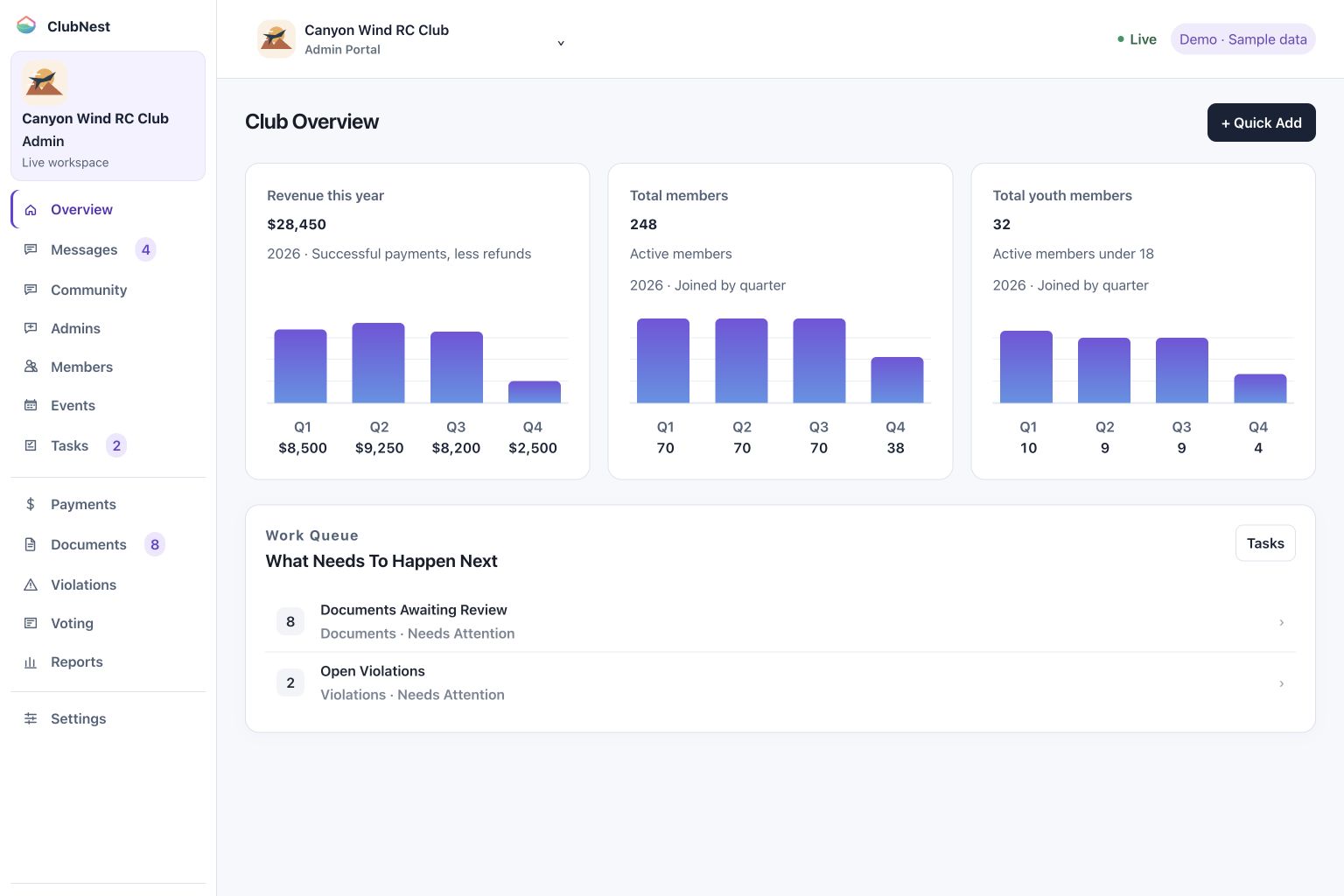
Review payment history, revenue dashboards and audited corrections.
Turn plans into participation.
Put events, details, and sign-ups where members can find them. Spend less time answering “when and where?”
Event registration & attendance
Publish event times, descriptions, attachments and location links. Members can access events and manage registrations, while administrators track participation and check-in.
Set start and end times and share event information.
Manage registrations and cancellations.
Record attendance and check-in; additional registration tools vary by workspace.
Get the important forms signed.
Handle waivers and documents with built-in signatures, assigned requirements, and completion tracking.
Documents & electronic signatures
The Document Hub separates Library, Requests, Review and History, with collections for club files, operations, membership and safety. Completed PDFs retain the signer, UTC completion time, authenticated account, consent, document fingerprint and form revision; signing-time email, browser and hosting-proxy IP evidence are included when recorded. Historical completions are not backfilled. Use Document Setup across every organization type to upload a document, place required or optional fields and choose delivery to one member, selected members, all active members or new members only. Current-member delivery can also include future joining members. Reference files can stay in every active and joining member’s portal without a signature. Members complete and sign enabled forms in their portals. Track progress from Sent to Reviewed to Finalized, with locked completion records and stamped PDF copies in member profiles and administrator contacts.
Send to all members or selected individuals.
Add custom questions and labels for text, date, checkbox, signature and initials fields.
Follow completion status and recover deleted documents where supported.
Required new-member online agreements need submitted completion or an explicit administrator waiver; reference-only files do not delay activation.
Keep everyone in the loop.
Give club news and conversations a home on your own website, with email tools to help members stay informed.
Club communication & email
Use private member and administrator conversations for direct follow-up, and text community threads for shared discussions. An admin-only room supports internal conversations and files.
Assign and close conversations with communication history.
Read one conversation at a time, with unread-first lists, named replies and Back and Next unread controls.
Keep internal group chats and files in the Admins workspace.
Send individual and group messages directly to member portals from Marketing, with three recent delivery entries in History. Welcome emails and connected email workflows retain their sender settings and consent controls.
Invite members with access codes and prefilled signup links.
Message individuals or groups, including non-renewals.
Connect parent accounts to youth profiles, with appropriate access to membership information and safeguards for younger members.
Member portal & family access
Members can update contact information, check status and balances, print branded membership cards, complete documents and participate in their organization’s activities.
Access documents, events, messages, elections and community discussions.
Print front and back membership cards with administrator-selected details.
Switch organization connections while retaining the same ClubNest login.
Give decisions a proper home.
Run ballots with eligibility rules and anonymous voting options. Keep governance work connected.
Club elections & governance
Configure ballots, voting eligibility and anonymous voting options. Maintain election results alongside accountability records and follow-up activity.
Set voting eligibility and ballot options.
Configure vote changes and view election results. Model Aviation administrators can enable candidate write-in voting for individual member ballots.
Maintain violation records and related follow-up.
Share the work. Keep the context.
Bring tasks, records, and operational queues together so your leadership team can keep things moving.
Administrator tools & workflows
Coordinate applications, reviews, approvals and follow-up tasks. Connect work queues with document requirements, invoices, renewals and member alerts.
Organize reviews and approval work.
Track follow-up alongside related member requirements.
Keep administrator activity traceable.
A dedicated administrator portal brings member conversations, contacts and follow-up work into one workspace, with unread counts beside each relevant navigation item.
Find member messages and contacts quickly.
Use subsection navigation and view additional details when needed.
Review recent communication history without losing context.
See what needs attention.
Check membership, financial activity, and outstanding work from a connected view of your organization.
Membership & financial reports
Explore membership, payment, event and operational reports. Filter by date and status, then export records for further analysis or your organization’s recovery needs.
Review membership, financial and participation activity.
Export CSV reports and Excel-compatible workbooks.
Create organization data exports and private recovery archives.
A member database that keeps the whole relationship in view.
Keep searchable member profiles, contact details, notes and activity history together. Review and map contact CSV columns and match membership names to existing plans before importing, or explicitly choose no plan. Historical joining dates are retained on new contacts without enabling later date edits. Pending maps to Applicant, Suspended to Inactive and Expired to Lapsed; original CSV values remain in administrator import history, including ignored columns. A name, email address or member number is enough to identify a contact; blank optional fields stay blank. Valid rows import independently, with created, updated, skipped and failed totals and row-level reasons. Existing email addresses, member numbers and identical previously imported rows are skipped without overwriting records. Complete the organization’s required contact-card fields before saving a later profile edit. Authorized administrators can review recorded changes and import sources in contact history. Recorded aviation credentials are not automatically verified.
Search profiles and maintain contact information.
Review imported contacts and send organization access links.
Connect household, team and organization relationships.
Keep aircraft reservations connected to your flying club.
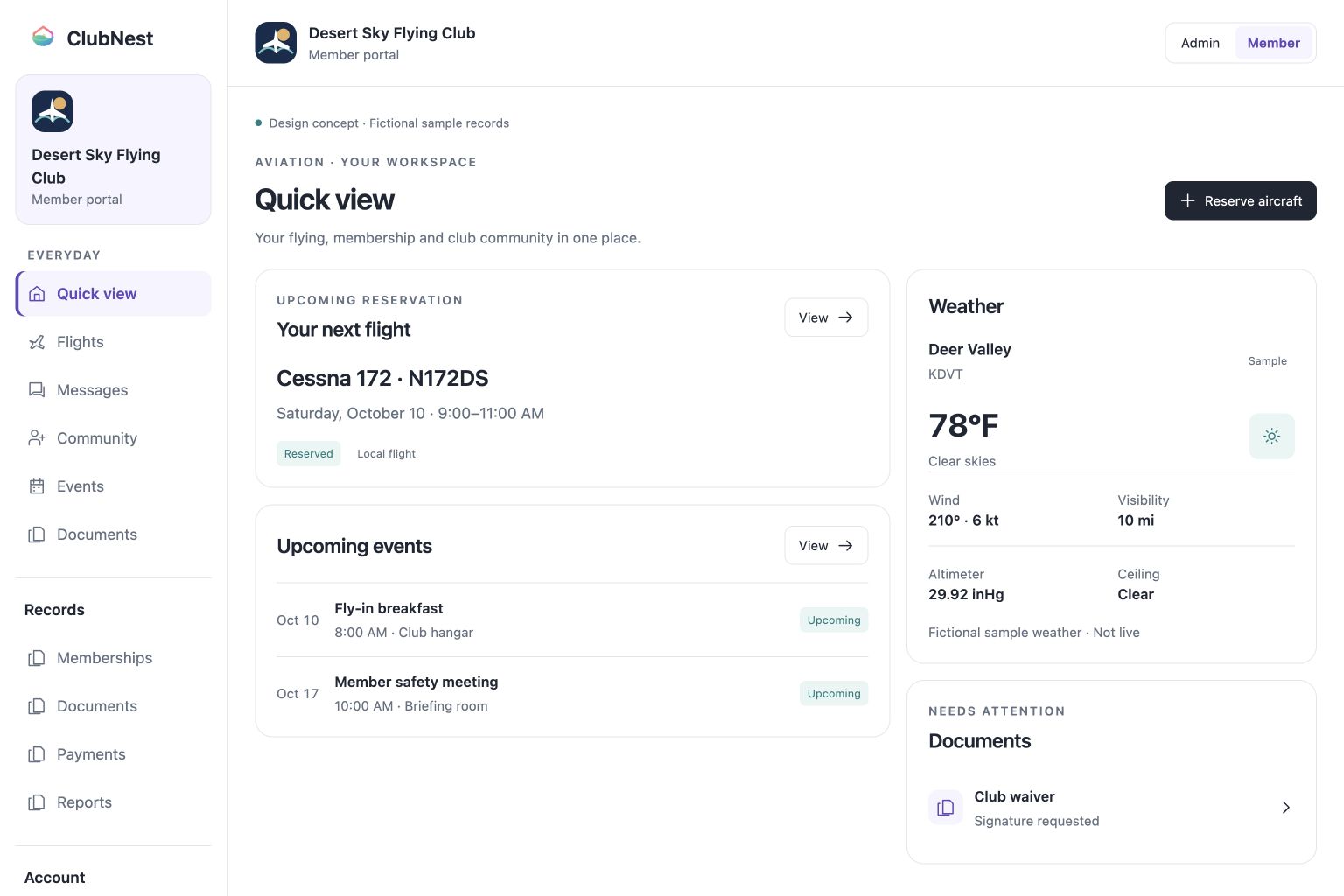
Aviation members can book from their portal with an aircraft selector, calendar, daily reservations and maintenance status. Club policies, recorded qualifications and scheduling conflicts are checked; immediate booking or administrator approval depends on club settings.
White member Home with your next reservation, upcoming events, documents and observed NOAA airport weather; Reserve aircraft opens the booking calendar
Optional instructors, weekly recurrence and backup requests, with club policy, recorded qualification and conflict checks
Member requests share administrator flight-operation records; immediate booking or approval depends on club settings
Pilot authorizations, airport preferences and private calendar subscriptions in Profile; flight history and invoices in Payments
Make the workspace yours and give each person the right access.
Follow a five-step setup, optionally import contacts and add your organization’s logo to both portals. Invite administrators and configure role permissions and organization settings.
Set up your workspace and optionally import contacts.
Add organization branding and multiple administrator logins.
Control profile-photo availability; uploads require configured image moderation.
Make outstanding activity easier to notice.
Administrator navigation shows unread counts beside the relevant section. Member notification bells and inboxes surface messages, documents, membership activity and tasks. Optional sound alerts depend on browser audio permissions.
Review new and unread notifications in each portal.
Follow member and administrator activity.
Use sound alerts when supported by browser permissions.
Support families with controlled visibility.
Identify youth records and link multiple parents through separate verified accounts and accepted invitations. Parents receive read-only insight into permitted family information.
View permitted membership, balance, document and message information.
Members aged 14–17 provide a parent or guardian name and separate email by default; organization owners can change this contact requirement.
Parent contacts are unverified and grant no account access or consent. Verified parent invitations, youth communication settings and confidential concern reporting remain separate safeguards.
Manage your organization’s subscription in the same place.
Choose the monthly or annual subscription listed on your product page, with core organization tools included. Owners manage checkout, eligible coupons, subscription billing and cancellation.
Manage monthly or annual workspace billing.
Review failed-payment alerts and the 24-hour grace period.
Restore access after payment clears; owners control cancellation and deletion.
Protect access to your organization’s records.
Private workspaces use permissions enforced in the application and database. Member records and private documents are encrypted in transit and at rest.
Use authenticator-app two-factor authentication and account recovery.
Automatic logout follows 10 minutes of inactivity in every portal.
Review audited administrator actions and private document access.
Online payments require a connected payment provider; email requires a configured sending service. Profile-photo uploads require configured image moderation. Available workflows depend on organization type, settings, and permissions. Children under 14 use parent-managed access. Youth safeguards require human oversight. Apple Wallet and Google Wallet cards are planned.
Two portals. One connected club.
A clear place for everyone. A shared picture for your team.
Members see what they need to do. Leaders see what needs their attention. Both use the same connected organization.
For your leadership team
Membership & payment records
Forms awaiting completion
Tasks, events & follow-ups
For your members
Pay dues & sign forms
Find events & club updates
View a digital member card
Built around your kind of flying
Find your ClubNest.
From aircraft scheduling to RC club memberships, find the tools built for your kind of flying.
A simpler next chapter
From scattered to connected.
1
Make it your club.
Choose your organization type, add your branding, and invite the people helping you run it.
2
Bring the essentials together.
Import supported contact fields from CSV, then set up membership options, forms, and events.
3
Invite everyone in.
Give members one familiar place to take part. Connect payment and email providers as needed.
CSV importing covers supported contact fields. It does not automatically migrate every financial or specialized operational record.
A few things you might be wondering
Let’s make it simple.
Can ClubNest replace our spreadsheets and separate club tools?
ClubNest brings membership records, invoicing, event registration, document signing, voting, and club conversations together. You can import supported contact fields from CSV. Online payments and email require connected services, and specialized workflows depend on your organization type.
Yes. Members can switch organization connections with one ClubNest login. Leaving one connection does not remove other connections. Historical records and existing obligations remain, and an owner must transfer ownership before leaving.
ClubNest is an all-in-one website for flying clubs and model aviation organizations. Leaders can organize memberships, dues, documents and events. Members have their own place to find information and take part.
Yes. Export supported contact information as CSV, map the fields and review the records before importing. Contact importing does not automatically migrate every financial or specialized operational record. Your product page explains additional migration options.
Online payments need a connected payment account; email delivery needs a configured provider. ClubNest takes no percentage of member dues. Plans include the published monthly email allowance, and extra email volume requires a separately priced add-on before purchase.
Children under 14 use parent-managed records without independent logins. Members aged 14–17 provide a parent or guardian contact by default; organization owners can change this contact requirement. Contact details do not grant parent access or establish consent. Verified, accepted parent invitations provide permitted read-only access; youth communication settings remain separate. These tools support your organization’s supervision and procedures.